
HP All-in-One 27-cb1126nh PC 12th Gen Intel Core i5-1235U 27 Inch FHD IPS 16GB RAM 512GB SSD Win 10 Pro
HP All-in-One 27-cb1126nh PC 12th Gen Intel Core i5-1235U 27 Inch FHD IPS 16GB RAM 512GB SSD Win 10 Pro
Description
Features
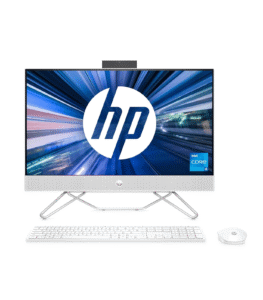
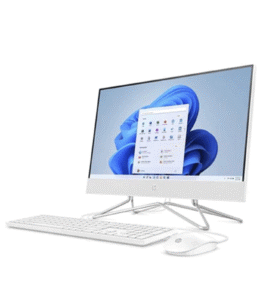
The HP All-in-One 27-cb1126nh PC showcases an elegant, minimalist design that blends modern aesthetics with functional efficiency. This system is built for users who appreciate a clutter-free workspace while maintaining powerful performance. The large 27-inch Full HD IPS display is framed with slim bezels that maximize screen real estate and enhance the overall viewing experience, making it suitable for professionals, home users, or anyone looking for a sleek and stylish computing setup. The edge-to-edge display sits on a refined yet sturdy stand that provides good elevation and stability, ensuring ergonomic comfort during long working hours. The integrated stand also helps with cable management and maintains a clean look. Its white chassis with silver accents gives it a professional yet inviting look that fits seamlessly into both office and home environments.
Display and Visual Experience
The 27-inch FHD IPS panel is one of the most striking features of the HP 27-cb1126nh, delivering wide viewing angles, accurate color reproduction, and sharp visual clarity. Whether you’re editing photos, watching high-definition videos, multitasking with multiple open windows, or simply browsing the web, the visual performance is consistently smooth and vibrant. IPS technology ensures that images remain consistent and color-accurate even when viewed from different angles, which is a valuable asset for collaborative work or when presenting content to others. The Full HD resolution at 1920 x 1080 pixels ensures that text is crisp and media content looks vibrant, reducing eye strain during extended use. The anti-glare coating on the screen enhances usability in brightly lit environments or rooms with natural light, minimizing reflections and preserving visual comfort throughout the day.
Processor and Performance
Under the hood, the HP All-in-One 27-cb1126nh is powered by the 12th Gen Intel Core i5-1235U processor, a high-efficiency yet capable CPU designed for handling a wide range of everyday computing tasks. Featuring 10 cores (2 performance cores and 8 efficiency cores) and 12 threads, this hybrid architecture balances power and energy consumption, delivering excellent performance in both single-threaded and multi-threaded applications. With a base clock of 1.3 GHz and turbo boost up to 4.4 GHz, the i5-1235U excels at handling demanding tasks like content creation, spreadsheet work, video streaming, and light gaming. This makes the PC a great fit for professionals who require a responsive system for multitasking or business applications, as well as casual users seeking reliable day-to-day performance.
Memory and Storage
This All-in-One comes equipped with 16GB of DDR4 RAM, allowing for seamless multitasking and enhanced responsiveness when running multiple applications simultaneously. The generous memory capacity is ideal for users who frequently juggle between web browsers, video conferencing tools, productivity suites, and media playback. It helps minimize slowdowns and supports an overall smoother computing experience. Paired with a 512GB PCIe NVMe SSD, the system offers both speed and storage efficiency. The SSD ensures quick boot times, fast application launches, and snappy file access, while the half-terabyte of storage gives ample room for storing documents, multimedia files, project data, and applications. Compared to traditional hard drives, the SSD’s solid-state architecture not only improves speed but also enhances durability and power efficiency, contributing to a quieter and cooler system.
Operating System and Software
Running on Windows 10 Pro, the HP All-in-One 27-cb1126nh caters to business users who demand enterprise-level features and additional security functionalities. Windows 10 Pro includes tools like BitLocker encryption, Remote Desktop access, Group Policy management, and assigned access, making it well-suited for small businesses, remote workers, and educational environments. The OS also supports legacy applications and compatibility with a wide range of peripherals and productivity software, while still benefiting from regular updates and security patches. It offers a familiar and stable user experience, which is especially valuable for professionals who prefer the classic Windows interface or need compatibility with specific business software solutions.
Webcam, Audio, and Communication
The built-in HP True Vision 720p HD webcam comes with an integrated dual-array digital microphone, offering a capable solution for video conferencing, virtual meetings, or online classes. The webcam provides clear visuals in decent lighting conditions and is suitable for platforms such as Zoom, Microsoft Teams, or Skype. Its dual mics reduce background noise and pick up voice clearly, contributing to better communication quality. On the audio front, the system features dual front-firing speakers tuned by HP’s audio technology. These speakers deliver crisp and clear sound that’s more than sufficient for video calls, music playback, or casual media consumption. For users seeking richer audio experiences, external speaker systems or headphones can be connected easily via the available ports or Bluetooth.
Security and Productivity Features
 Security features embedded within the HP All-in-One 27-cb1126nh include firmware-level protections such as TPM 2.0 for hardware-based encryption, BIOS-level integrity checks, and password-protected boot options. These enterprise-grade features are especially relevant for users who store sensitive data or rely on secure remote access. Productivity is also a key aspect of this system, with support for Windows Hello through external accessories for biometric login, or the potential to upgrade the webcam to a facial-recognition-compatible one. The system supports the Microsoft Office suite and a wide range of third-party tools used in project management, graphic design, online education, and business reporting. Users can also benefit from HP’s own utility software such as HP Support Assistant, which keeps the system up to date and helps troubleshoot issues with ease.
Environmental Impact and Energy Efficiency
HP emphasizes sustainability and environmental responsibility in its product design, and the 27-cb1126nh is no exception. The PC is ENERGY STAR® certified and EPEAT® registered, which means it meets stringent criteria for power efficiency and environmentally friendly design. The packaging may include recycled materials, and the device itself may contain post-consumer recycled plastics in its construction. These small but meaningful steps contribute to reducing the carbon footprint of the device and align with broader sustainability goals. The system also includes energy-efficient power management settings and sleep modes that help reduce electricity usage without compromising performance.
User Experience and Everyday Use
In daily use, the HP All-in-One 27-cb1126nh excels at being intuitive, quiet, and user-friendly. Boot-up is fast, applications respond quickly, and switching between tasks feels effortless, thanks to the optimized combination of hardware and software. Its silent operation and minimalistic setup allow it to fit into a living room, study, or office space without being obtrusive. Users who require consistent uptime, such as teachers conducting online lessons, employees working remotely, or students attending digital classrooms, will appreciate the reliability and responsive nature of the machine. It’s equally suitable for families looking for a shared home computer that can handle web browsing, school assignments, photo storage, streaming services, and occasional light gaming.
Upgradeability and Maintenance
While All-in-One PCs are generally not as upgrade-friendly as traditional desktops, HP has designed this model with some degree of accessibility. Users may be able to upgrade or replace storage drives and memory modules, although it may require technical know-how or professional assistance. This means that future performance demands can be partially met through memory upgrades or transitioning to a larger SSD. HP’s customer support and documentation also make it easier to perform routine maintenance or resolve minor issues without the need for external service. The included warranty and service plans may also offer peace of mind for users worried about potential hardware concerns.
the HP All-in-One 27-cb1126nh PC offers an excellent blend of power, functionality, and design in a single streamlined package. Its 12th Gen Intel Core i5 processor, large Full HD display, 16GB RAM, and SSD storage combine to create a responsive and productive environment for a wide range of users — from professionals and students to small businesses and casual home users. The system’s premium look, ample connectivity, and thoughtful features make it a compelling choice for anyone who values performance in an elegant, space-saving form factor. With Windows 10 Pro pre-installed, it leans toward users who require business-grade software compatibility and security, all while keeping user experience front and center. Whether it’s used for work, entertainment, education, or communication, this All-in-One is equipped to handle the modern user’s daily computing demands with style and dependability.
Connectivity and Expansion Options
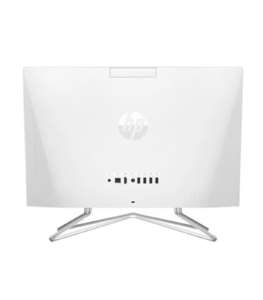 The HP All-in-One 27-cb1126nh is generously equipped with a variety of connectivity options to accommodate modern computing needs. It includes multiple USB Type-A and USB Type-C ports for connecting peripherals such as external drives, printers, and smartphones. Additionally, the inclusion of HDMI output enables you to connect a second monitor or project content to an external display. A headphone/microphone combo jack provides audio I/O support, while an RJ-45 Ethernet port ensures reliable wired internet connectivity when needed. For wireless networking, the system is equipped with Wi-Fi 6 and Bluetooth 5.2, allowing for fast internet access and stable connections with wireless devices like keyboards, mice, headphones, and speakers. This wide array of connectivity ensures that users won’t feel constrained by ports or limited in peripheral options, making it easy to set up a comprehensive workstation.