
Samsung M5 LS27DM500EMXUE 27 Inch Smart FHD Flat Monitor – Black
Samsung M5 LS27DM500EMXUE 27 Inch Smart FHD Flat Monitor – Black
Description
Features
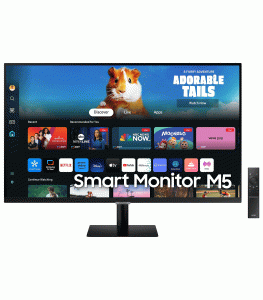 The Samsung M5 LS27DM500EMXUE Smart Monitor is an embodiment of modern minimalism paired with functional brilliance. At first glance, its sleek and sophisticated black finish offers a contemporary look that seamlessly fits into home offices, workspaces, and even living rooms. The 27-inch screen rests on a minimalistic stand that supports tilt adjustments, providing the flexibility to optimize viewing angles. The ultra-slim bezels and flat-panel display make it perfect for multi-monitor setups without visual interruption. The monitor’s black matte texture reduces glare while offering a premium touch. Its cable management design ensures a clutter-free workspace, which is a significant advantage for users aiming to maintain a clean and organized desktop. Whether used as a workstation centerpiece or as part of a home entertainment setup, this monitor’s design allows it to stand out while effortlessly blending in.
Smart Features for a New Age of Computing
One of the key highlights of the Samsung M5 LS27DM500EMXUE is its smart functionality, which transforms it from a traditional monitor into a standalone media hub. Running on Samsung’s Tizen operating system—the same platform powering their Smart TVs—the monitor supports a range of built-in apps such as Netflix, YouTube, and Samsung TV Plus, eliminating the need for a PC or external device to stream content. With integrated Wi-Fi and Bluetooth, users can enjoy wireless functionality across multiple use cases, from accessing cloud services like Microsoft 365 and Google Docs to connecting peripherals such as keyboards, mice, or game controllers. Samsung’s integration with DeX further allows users to connect their Galaxy smartphones wirelessly and use them in a desktop-like environment. This smart monitor is essentially an all-in-one solution designed for work, play, and everything in between.
Display Performance and Visual Quality
The Samsung M5 Smart Monitor boasts a 27-inch FHD (1920 x 1080) LED panel that delivers sharp, vibrant, and detailed visuals. With a refresh rate of 60Hz and a response time of 8ms (GTG), it caters well to casual gaming, video streaming, and productivity applications. The VA (Vertical Alignment) panel technology provides deep blacks and decent color reproduction with a 3000:1 contrast ratio, making it ideal for multimedia consumption. The monitor supports HDR10, enhancing color and contrast in supported content, although it’s more effective for casual HDR experiences rather than professional-grade color work. The 178° horizontal and vertical viewing angles ensure consistent picture quality regardless of where you’re sitting. Whether you’re watching a movie, editing photos, or participating in a video call, the Samsung M5 offers a solid visual experience without compromising on comfort.
Work-Friendly Tools and Remote Access
Designed with productivity in mind, the Samsung M5 LS27DM500EMXUE is loaded with features that make remote work and learning more convenient. One standout feature is Remote Access, which allows users to connect to their office PC securely from home using remote desktop services. This can be a game-changer for professionals working in hybrid or remote models. The monitor also includes Microsoft 365 integration, enabling users to access, edit, and save documents directly to the cloud—without needing a PC. Furthermore, screen sharing and wireless display features such as AirPlay 2 and Screen Mirroring make it easy to project content from iOS and Android devices, respectively. These productivity-centric capabilities turn the M5 monitor into a versatile hub that supports multitasking, document handling, and presentation delivery from the comfort of your desk or even your couch.
Entertainment and Streaming Capabilities
Beyond work, the Samsung M5 monitor shines as a personal entertainment center. The Tizen OS allows seamless streaming from major platforms like Netflix, Amazon Prime Video, Disney+, and YouTube. With Samsung TV Plus, users also get access to free live content without any subscription, bringing a smart TV experience to a monitor. Its Full HD resolution may not compete with 4K in pixel density, but it does provide crisp visuals with enough clarity for casual binge-watching. The built-in dual 5W stereo speakers eliminate the need for external audio accessories, delivering decent sound for both music and movies. Users can even control playback with voice commands through Bixby, Samsung’s voice assistant. The monitor also supports Smart Hub, allowing for quick navigation of apps, settings, and inputs using a remote control, which comes included in the box—a rarity among monitors in its price range.
Gaming Readiness and Console Compatibility
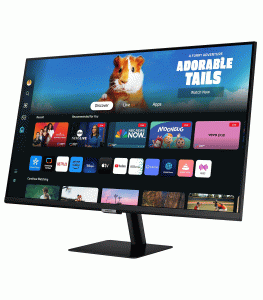 Although not marketed as a high-end gaming monitor, the Samsung M5 offers satisfactory gaming performance for casual players. Its 60Hz refresh rate and 4ms (GTG) response time are adequate for most console games and casual PC gaming experiences. What makes it especially appealing to console gamers is the Auto Source Switch+ feature, which detects when a connected device turns on and automatically switches to the correct input source. This convenience is enhanced by the FHD resolution, making it a great match for Xbox Series S, PS4, Nintendo Switch, or even cloud gaming platforms like Xbox Cloud Gaming. Additionally, Game Mode optimizes screen settings for fast-moving scenes, reducing input lag and enhancing visibility in dark areas. Though not a substitute for a dedicated gaming monitor, the M5 holds its own as a secondary display or a budget-friendly gaming solution for casual sessions.
User Experience and Interface Navigation
Navigating the Samsung M5’s interface is an intuitive experience, thanks to its well-structured Tizen UI. The smart interface borrows heavily from Samsung’s Smart TVs, offering a familiar and responsive layout for app navigation, settings adjustments, and content browsing. The included remote control, complete with dedicated app buttons, makes this monitor feel more like a TV than a traditional PC screen. Setup is straightforward, with step-by-step instructions guiding users through Wi-Fi configuration, Samsung account login, and app downloads. Once configured, the monitor retains personalized settings and login states, making it easy to pick up where you left off. Firmware updates are delivered over-the-air, ensuring that the monitor remains up-to-date with the latest features and security enhancements. With thoughtful UI design and user-centric features, the Samsung M5 offers an impressively refined experience for both tech-savvy users and newcomers.
Energy Efficiency and Eco-Conscious Design
Samsung has equipped the M5 LS27DM500EMXUE with a range of eco-friendly features that enhance energy efficiency. The monitor complies with global energy standards and includes a Power Saving Mode that dims the screen or turns it off when not in use. The Eco Saving Plus function intelligently adjusts brightness based on the screen’s black areas, reducing overall power consumption without compromising user experience. Additionally, the use of recyclable materials in the product’s design and packaging reflects Samsung’s commitment to sustainability. The monitor’s standby power consumption is remarkably low, and automatic off timers can be configured to limit energy use during idle periods. These features not only help reduce environmental impact but also cut down electricity bills in the long run, making the M5 a smart choice for users who are conscious of both cost and the planet.
Value Proposition and Target Audience
The Samsung M5 LS27DM500EMXUE 27 Inch Smart FHD Flat Monitor delivers exceptional value by combining the utility of a monitor with the intelligence of a smart TV. At its price point, it caters to students, remote professionals, casual gamers, and even content consumers looking for a simplified and multifunctional display solution. It’s particularly well-suited for people with limited desk space who want a single device that can serve as both a monitor and an entertainment center. Its versatility, built-in speakers, remote control, and smart OS make it an ideal choice for dorm rooms, home offices, small apartments, and even shared family spaces. While it may not satisfy professionals with demanding color accuracy needs or competitive gamers seeking high refresh rates, the M5 offers a well-rounded and forward-thinking package. It brings the vision of a “do-it-all” screen to life, bridging the gap between productivity and entertainment in a way few other monitors do.
Connectivity and Port Selection
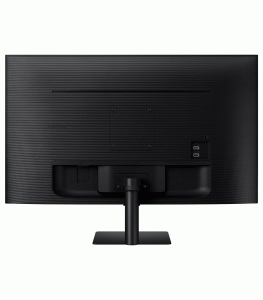 When it comes to connectivity, the Samsung M5 LS27DM500EMXUE is thoughtfully equipped to support a range of devices and user scenarios. It features two HDMI 2.0 ports, two USB-A 2.0 ports, and a USB Type-C port, which not only transmits video signals but also supports 65W charging—an essential feature for laptop users who want to simplify their desktop setup. The monitor also includes Wi-Fi 5 and Bluetooth 4.2, enabling wireless peripherals and smart device connectivity. This comprehensive selection of ports and wireless options ensures that the M5 can serve as a workstation for laptops, a screen for streaming devices, or even a console display. Its seamless connection to smartphones via Samsung DeX and Apple AirPlay 2 further expands its versatility. You won’t be short on options when integrating this monitor into a broader tech ecosystem.